- Suggestions
-
 Ideas
Ideas

+1
Completed
Ability to copy forum (mesage board) links for all images right after upload
That + an "Auto Resize" option when you are not logged in would be "The Panacea" :-)
I mean, right after finished upload in this screen:
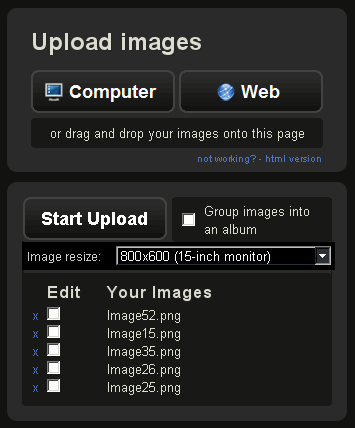
You have someplace where you can direct copy something like this:
[img]http://imgur.com/image52.png[/img]
[img]http://imgur.com/image15.png[/img]
[img]http://imgur.com/image35.png[/img]
[img]http://imgur.com/image36.png[/img]
[img]http://imgur.com/image25.png[/img]
Customer support service by UserEcho


And what's about the option to resize directly, without going through the editing (always unlogged I talking)
The ability to copy all links together is also not available.
You can go to "First image", copy link and paste to destination, then go to "Second Image" and copy/paste it, and so on... but the idea was to have the ability to copy ALL links in one single step
Great!!... sorry, had not seen the option before